> For the complete documentation index, see [llms.txt](https://docs.infraon.io/infinity/llms.txt). Markdown versions of documentation pages are available by appending `.md` to page URLs; this page is available as [Markdown](https://docs.infraon.io/infinity/user-guide/workspace/agentic-bot.md). Agents can also search and read this documentation through its [MCP server](https://docs.infraon.io/infinity/~gitbook/mcp).

# Agentic Bot

Agentic Bot is an **AI-powered conversational assistant** available within the Workspace module. It enables users and technicians to interact with Infraon Infinity services through natural-language conversations for ticket management, request handling, issue troubleshooting, and operational assistance.

The Agentic Bot helps users perform **ITSM-related activities** directly in the chat interface, without navigating multiple modules or forms.

The module supports conversational workflows for:

* Ticket creation and management
* Request inquiry and tracking
* AI-assisted troubleshooting
* Human handover to live technicians
* Real-time conversational support
* Service classification and recommendations
* Chat history and session continuity

![](https://content.gitbook.com/content/HOkWBaqDGJVTArkIQTsj/blobs/h2sPFbHtaxpruan5Onp1/Unknown%20image)

## **How does it work?**

Users access the Agentic Bot from the Workspace module.

* The AI assistant analyzes user queries and identifies the required action.
* The system classifies the request based on available services and workflows.
* The AI provides troubleshooting guidance or operational assistance.
* For sensitive operations such as ticket creation or technician handover, the AI requests user confirmation before execution.
* The system performs the requested action after approval.
* If required, the conversation can be transferred to a live technician.
* All conversations and actions are stored for audit and tracking purposes.

![](https://content.gitbook.com/content/HOkWBaqDGJVTArkIQTsj/blobs/dBX8ferE5Hyt3XAh6tS5/Unknown%20image)

The Agentic Bot provides a visual execution experience that displays the agent's processing status, execution progress, and response details while processing a request.

During execution, the input field is temporarily disabled to prevent multiple requests, and users can stop the request if required. Once processing is complete, the execution summary is displayed along with the response.

<figure><img src="https://content.gitbook.com/content/HOkWBaqDGJVTArkIQTsj/blobs/N8TcHRZPcoB6bQfukV71/image.png" alt=""><figcaption></figcaption></figure>

## **Navigating Agentic Bot**

To access Agentic Bot:

* Navigate to Workspace.
* Select the Agentic Bot icon from the left panel.
* Start a new chat session or select an existing conversation.

![](https://content.gitbook.com/content/HOkWBaqDGJVTArkIQTsj/blobs/KSe7wcrjEFt1TdFAT2Il/Unknown%20image)

### **Agentic Bot Interface**

The Agentic Bot interface contains the following sections:

<table><thead><tr><th width="241.199951171875">Section</th><th>Description</th></tr></thead><tbody><tr><td><strong>Chat Sessions Panel</strong></td><td>Displays active and previous AI chat sessions.</td></tr><tr><td><strong>Search Bar</strong></td><td>Allows users to search previous AI conversations.</td></tr><tr><td><strong>Conversation Window</strong></td><td>Displays interactions between the user and the AI assistant.</td></tr><tr><td><strong>AI Action Header</strong></td><td>Displays the current AI operation and processing steps.</td></tr><tr><td><strong>Message Composer</strong></td><td>Allows users to send queries and instructions to the AI assistant.</td></tr><tr><td><strong>Workflow Status Area</strong></td><td>Displays AI processing stages such as classification, validation, or ticket creation.</td></tr></tbody></table>

## **Service Management**

Agentic Bot supports conversational service management operations for both tickets and requests.

Supported operations include:

* Create tickets through chat
* Create service requests
* View ticket details
* Retrieve request information
* Check ticket status
* Search tickets using keywords
* Filter tickets by status or date
* View assigned tickets
* Retrieve requester-specific tickets
* Generate issue summaries
* Request technician handover

The AI automatically identifies the required workflow based on the user's conversation.

### **Ticket Management**

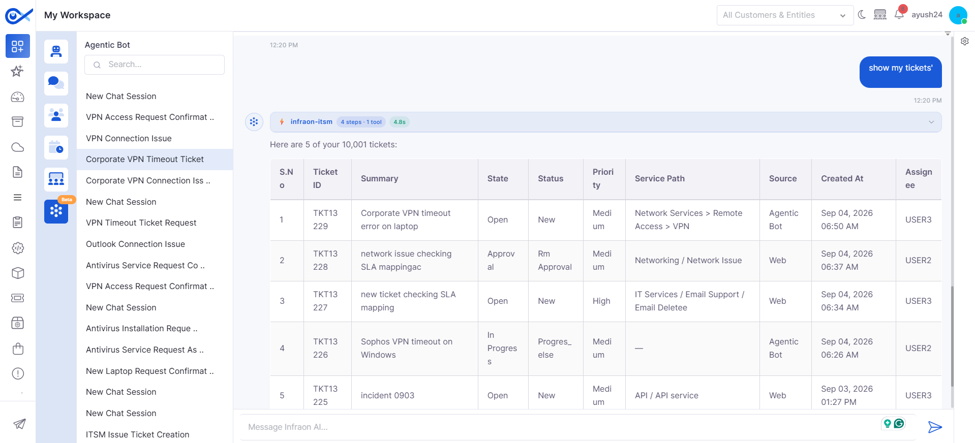
The Agentic Bot enables users to manage tickets through natural-language conversations. Users can create, search, view, update, assign, resolve, close, and reopen tickets, and access ticket details, history, conversations, attachments, tasks, relationships, approvals, and SLA information. The Agentic Bot guides users through the required information and validations for ticket-related activities.

<figure><img src="https://content.gitbook.com/content/HOkWBaqDGJVTArkIQTsj/blobs/z7M2uUDYJwv5uQEV4yTT/image.png" alt=""><figcaption></figcaption></figure>

#### Ticket Activities

<table><thead><tr><th width="177.60003662109375" valign="top">Label</th><th width="200.39990234375" valign="top">Action</th><th valign="top">Description / Example</th></tr></thead><tbody><tr><td valign="top"><strong>Create Ticket</strong></td><td valign="top">Enter the issue or requirement in natural language and provide the required information.</td><td valign="top"><p>Creates a new ticket based on the user's description. </p><p></p><p><strong>Example:</strong> <em>“Create a ticket for my laptop not connecting to Wi-Fi.”</em></p></td></tr><tr><td valign="top"><strong>Search Tickets</strong></td><td valign="top">Ask the bot to search for tickets.</td><td valign="top"><p>Retrieves tickets based on the user's query. </p><p></p><p><strong>Example:</strong> <em>“Show my tickets.”</em></p></td></tr><tr><td valign="top"><strong>View Open Tickets</strong></td><td valign="top">Ask to view open or active tickets.</td><td valign="top"><p>Displays tickets that are currently active. </p><p></p><p><strong>Example:</strong> <em>“Show my open tickets.”</em></p></td></tr><tr><td valign="top"><strong>View Closed Tickets</strong></td><td valign="top">Ask to view closed tickets.</td><td valign="top"><p>Retrieves tickets that have been closed. </p><p></p><p><strong>Example:</strong> <em>“Show my closed tickets.”</em></p></td></tr><tr><td valign="top"><strong>View Recent Tickets</strong></td><td valign="top">Ask for recent tickets.</td><td valign="top">Displays recently created or relevant tickets.</td></tr><tr><td valign="top"><strong>Count Tickets</strong></td><td valign="top">Ask how many tickets match a condition.</td><td valign="top"><p>Returns the number of matching tickets. </p><p></p><p><strong>Example:</strong> <em>“How many open tickets do I have?”</em></p></td></tr><tr><td valign="top"><strong>View Ticket Details</strong></td><td valign="top">Provide a Ticket ID or refer to the ticket in the conversation.</td><td valign="top"><p>Displays available ticket information such as summary, description, requester, assignee, status, priority, and related information. </p><p></p><p><strong>Example:</strong> <em>“Show details of INC1115.”</em></p></td></tr><tr><td valign="top"><strong>Check Ticket Status</strong></td><td valign="top">Ask for the status of a ticket.</td><td valign="top"><p>Displays the current ticket status and relevant information. </p><p></p><p><strong>Example:</strong> <em>“What is the status of INC1115?”</em></p></td></tr><tr><td valign="top"><strong>Update Ticket</strong></td><td valign="top">Ask the bot to modify supported ticket details.</td><td valign="top"><p>Updates supported ticket information according to applicable permissions and validations. </p><p></p><p><strong>Example:</strong> <em>“Change INC1115 priority to High.”</em></p></td></tr><tr><td valign="top"><strong>Assign Ticket</strong></td><td valign="top">Ask the bot to assign a ticket to a team or technician.</td><td valign="top"><p>Assigns the ticket to the specified team or technician. </p><p></p><p><strong>Example:</strong> <em>“Assign INC1115 to Help Desk.”</em></p></td></tr><tr><td valign="top"><strong>Change Ticket Status</strong></td><td valign="top">Ask to move the ticket to an available status.</td><td valign="top"><p>Changes the ticket status according to workflow rules. </p><p></p><p><strong>Example:</strong> <em>“Move INC1115 to In Progress.”</em></p></td></tr><tr><td valign="top"><strong>Resolve Ticket</strong></td><td valign="top">Ask the bot to resolve the ticket and provide resolution notes.</td><td valign="top"><p>Resolves the ticket after validating the required information. </p><p></p><p><strong>Example:</strong> <em>“Resolve INC1115 with note Network access restored.”</em></p></td></tr><tr><td valign="top"><strong>Close Ticket</strong></td><td valign="top">Ask the bot to close a resolved ticket and provide closure information.</td><td valign="top">Closes the ticket using the applicable closure workflow and information.</td></tr><tr><td valign="top"><strong>Reopen Ticket</strong></td><td valign="top">Ask the bot to reopen a previously resolved or closed ticket.</td><td valign="top"><p>Reopens the ticket when permitted by the applicable workflow. </p><p></p><p><strong>Example:</strong> <em>“Reopen INC1115.”</em></p></td></tr><tr><td valign="top"><strong>Add Public Note</strong></td><td valign="top">Ask the bot to add a note to the ticket.</td><td valign="top"><p>Adds a requester-visible note or operational comment. </p><p></p><p><strong>Example:</strong> <em>“Add note Waiting for user confirmation.”</em></p></td></tr><tr><td valign="top"><strong>Add Private Worklog</strong></td><td valign="top">Ask the bot to add an internal worklog.</td><td valign="top">Adds an internal technician-only comment or work update.</td></tr><tr><td valign="top"><strong>View Conversation</strong></td><td valign="top">Ask to view the ticket conversation.</td><td valign="top">Retrieves messages, participants, timestamps, and communication history associated with the ticket.</td></tr><tr><td valign="top"><strong>View History</strong></td><td valign="top">Ask to view ticket history.</td><td valign="top">Displays ticket activities such as status changes, assignment updates, resolution actions, and closure activities.</td></tr><tr><td valign="top"><strong>View Attachments</strong></td><td valign="top">Ask to view ticket attachments.</td><td valign="top">Retrieves attachments associated with the ticket and their available information.</td></tr><tr><td valign="top"><strong>Delete Attachment</strong></td><td valign="top">Ask to delete an attachment and confirm the action.</td><td valign="top">Deletes the selected attachment after confirmation.</td></tr><tr><td valign="top"><strong>View Tasks</strong></td><td valign="top">Ask to view tasks associated with a ticket.</td><td valign="top">Displays tasks associated with the ticket.</td></tr><tr><td valign="top"><strong>Create Task</strong></td><td valign="top">Ask the bot to create a task and confirm the action.</td><td valign="top">Creates a task associated with the ticket after confirmation.</td></tr><tr><td valign="top"><strong>Update Task</strong></td><td valign="top">Ask to update a ticket task.</td><td valign="top">Updates the status or applicable details of the selected task.</td></tr><tr><td valign="top"><strong>Delete Task</strong></td><td valign="top">Ask to delete a ticket task and confirm the action.</td><td valign="top">Deletes the selected task after confirmation.</td></tr><tr><td valign="top"><strong>View Related Tickets</strong></td><td valign="top">Ask to view tickets related to the current ticket.</td><td valign="top">Displays existing relationships between tickets.</td></tr><tr><td valign="top"><strong>Relate Tickets</strong></td><td valign="top">Specify the tickets that should be related.</td><td valign="top"><p>Creates a relationship between tickets. </p><p></p><p><strong>Example:</strong> <em>“Relate INC1115 to INC1116.”</em></p></td></tr><tr><td valign="top"><strong>Manage Tags</strong></td><td valign="top">Ask to add, remove, or replace ticket tags.</td><td valign="top">Updates ticket tags according to the requested action.</td></tr><tr><td valign="top"><strong>Bulk Assignment</strong></td><td valign="top">Provide multiple Ticket IDs and specify the team or technician.</td><td valign="top"><p>Assigns multiple tickets in a single operation. </p><p></p><p><strong>Example:</strong> <em>“Assign INC1115 and INC1116 to Help Desk.”</em></p></td></tr><tr><td valign="top"><strong>Bulk Priority Update</strong></td><td valign="top">Provide multiple Ticket IDs and specify the new priority.</td><td valign="top">Updates the priority of multiple tickets while applying the required validation.</td></tr><tr><td valign="top"><strong>Bulk Resolution</strong></td><td valign="top">Provide multiple Ticket IDs and resolution notes.</td><td valign="top">Resolves multiple eligible tickets and reports the operation results.</td></tr><tr><td valign="top"><strong>Check Approval</strong></td><td valign="top">Ask whether a ticket can be approved.</td><td valign="top">Displays approval eligibility and approval status when applicable.</td></tr><tr><td valign="top"><strong>View SLA Status</strong></td><td valign="top">Ask for the SLA status of a ticket.</td><td valign="top">Displays applicable SLA targets, breach conditions, and the current SLA state.</td></tr></tbody></table>

**Ticket Creation**

The Agentic Bot lets users create tickets through natural-language conversations. Users can describe the issue or requirement in the chat, and the bot guides them through the required information before creating the ticket.

{% stepper %}
{% step %}

#### Open Workspace

Open **Workspace** from the left navigation.
{% endstep %}

{% step %}

#### Select Agentic Bot

Select **Agentic Bot**.
{% endstep %}

{% step %}

#### Enter the issue or requirement

Enter the issue or requirement in the chat window. For example:

* *“My laptop is not connecting to Wi-Fi.”*
* *“Create a ticket for a printer issue.”*
* *“I am unable to access the application.”*
  {% endstep %}

{% step %}

#### Review identified ticket details

The Agentic Bot analyzes the information provided and identifies the required ticket details.
{% endstep %}

{% step %}

#### Provide additional information

Provide any additional information requested by the bot.
{% endstep %}

{% step %}

#### Review the ticket information

Review the ticket information.
{% endstep %}

{% step %}

#### Confirm ticket creation

Confirm the ticket creation.
{% endstep %}

{% step %}

#### View the Ticket ID

The ticket is created and the **Ticket ID** is displayed.
{% endstep %}
{% endstepper %}

<table><thead><tr><th width="170.39999389648438">Label</th><th width="197">Action</th><th>Description / Example</th></tr></thead><tbody><tr><td><strong>Issue Description</strong></td><td>Describe the issue or requirement in natural language.</td><td><p>Provides the details of the issue for which the ticket needs to be created. </p><p></p><p><strong>Example:</strong> <em>“My laptop is not connecting to Wi-Fi.”</em></p></td></tr><tr><td><strong>Ticket Details</strong></td><td>Provide additional information requested by the bot.</td><td>Provides the required information to complete ticket creation.</td></tr><tr><td><strong>Confirmation</strong></td><td>Review and confirm the ticket details.</td><td>Confirms that the ticket should be created with the provided information.</td></tr><tr><td><strong>Ticket ID</strong></td><td>View the ID displayed after creation.</td><td><p>Identifies the newly created ticket. </p><p></p><p><strong>Example:</strong> INC1115.</p></td></tr></tbody></table>

### **Request Management**

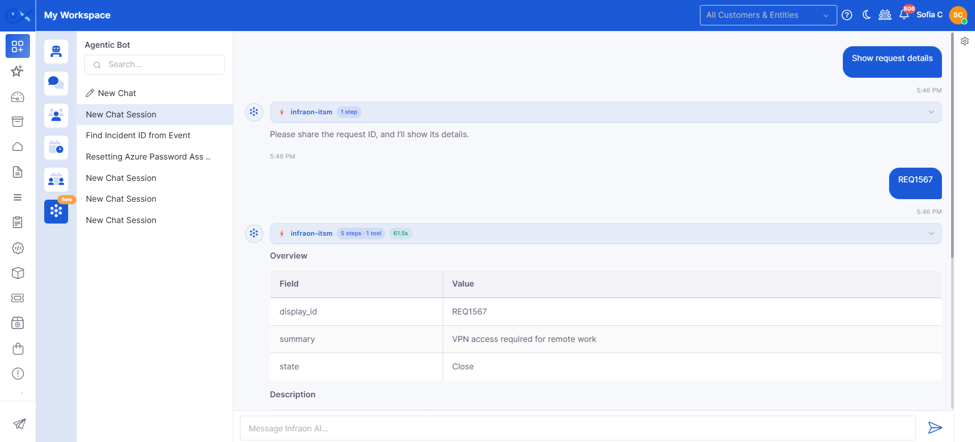
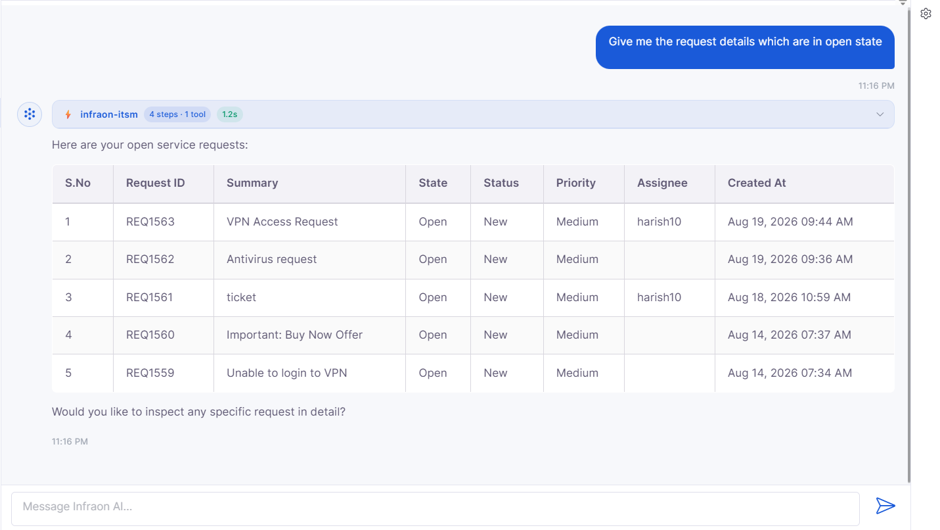
The Agentic Bot enables users to manage service requests through natural-language conversations, from creating and tracking requests to updating, assigning, resolving, and closing them. Users can also view request details, history, conversations, attachments, tasks, relationships, approvals, and SLA information, as well as perform request conversions and bulk operations. The Agentic Bot guides users through the required information and validations to complete request-related activities.

<figure><img src="https://content.gitbook.com/content/HOkWBaqDGJVTArkIQTsj/blobs/S47BHRe5OSRbJcyW3ELB/image.png" alt=""><figcaption></figcaption></figure>

#### Request Activities

<table><thead><tr><th width="164">Label</th><th width="193">Action</th><th>Description / Example</th></tr></thead><tbody><tr><td><strong>Create Request</strong></td><td>Enter the requirement in natural language and confirm the suggested service.</td><td><p>Creates a new service request. </p><p></p><p><strong>Example</strong>: <em>“I need a new laptop for a new joiner.”</em> The bot identifies the applicable service, asks for confirmation, and creates the request.</p></td></tr><tr><td><strong>Search Requests</strong></td><td>Ask the bot to show or search for requests.</td><td><p>Retrieves requests based on the user's query. </p><p></p><p><strong>Example</strong>: <em>“Show my requests.”</em></p></td></tr><tr><td><strong>View Open Requests</strong></td><td>Ask to view open or active requests.</td><td><p>Displays requests that are currently active. </p><p></p><p><strong>Example</strong>: <em>“Show my open requests.”</em></p></td></tr><tr><td><strong>View Closed Requests</strong></td><td>Ask to view closed requests.</td><td>Retrieves the user's closed requests.</td></tr><tr><td><strong>View Recent Requests</strong></td><td>Ask for recent requests.</td><td>Displays recently created or relevant requests.</td></tr><tr><td><strong>Count Requests</strong></td><td>Ask how many requests match a condition.</td><td><p>Returns the number of matching requests without retrieving the complete request list. </p><p></p><p><strong>Example</strong>: <em>“How many open requests do I have?”</em></p></td></tr><tr><td><strong>View Request Details</strong></td><td>Provide a Request ID or refer to the request in the current conversation.</td><td><p>Displays available request information such as summary, description, requester, assignee, status, priority, service, tags, and related information. </p><p></p><p><strong>Example</strong>: <em>“Show details of REQ1115.”</em></p></td></tr><tr><td><strong>Check Request Status</strong></td><td>Ask for the status of a request.</td><td><p>Displays the current status and relevant request information. </p><p></p><p><strong>Example</strong>: <em>“What is the status of REQ1115?”</em></p></td></tr><tr><td><strong>Update Request</strong></td><td>Ask the bot to modify supported request details.</td><td><p>Updates fields such as <strong>Priority, Urgency, Summary, Description, Service,</strong> or <strong>Tags</strong>, subject to validation and permissions. </p><p></p><p><strong>Example</strong>: <em>“Change REQ1115 priority to High.”</em></p></td></tr><tr><td><strong>Change Service</strong></td><td>Ask to change the service associated with a request.</td><td>Guides the user through selecting a new service, validating service classification, selecting the workflow status, and providing a reason before applying the change.</td></tr><tr><td><strong>Assign Request</strong></td><td>Ask the bot to assign a request to a team or technician.</td><td><p>Guides the user through <strong>Team → Expertise → Level → Technician</strong> selection and assigns the request. </p><p></p><p><strong>Example</strong>: <em>“Assign REQ1115 to Help Desk.”</em></p></td></tr><tr><td><strong>Change Status</strong></td><td>Ask to move a request to an available workflow status.</td><td><p>Changes the request status according to workflow rules. </p><p></p><p><strong>Example</strong>: <em>“Move REQ1115 to In Progress.”</em></p></td></tr><tr><td><strong>Resolve Request</strong></td><td>Ask the bot to resolve a request and provide resolution notes.</td><td><p>Resolves the request after validating the required workflow information. </p><p></p><p><strong>Example</strong>: <em>“Resolve REQ1115 with note Access granted.”</em></p></td></tr><tr><td><strong>Close Request</strong></td><td>Ask the bot to close a resolved request and provide closure information.</td><td>Closes the request using the applicable closure workflow and notes.</td></tr><tr><td><strong>Reopen Request</strong></td><td>Ask the bot to reopen a previously resolved request.</td><td><p>Reopens the request when the applicable workflow allows it. </p><p></p><p><strong>Example</strong>: <em>“Reopen REQ1115.”</em></p></td></tr><tr><td><strong>Add Public Note</strong></td><td>Ask the bot to add a note to the request.</td><td><p>Adds a requester-visible operational note. </p><p></p><p><strong>Example</strong>: <em>“Add note Waiting on procurement approval.”</em></p></td></tr><tr><td><strong>Add Private Worklog</strong></td><td>Ask the bot to add an internal worklog.</td><td>Adds a technician-only comment or internal update and supports time-tracking information.</td></tr><tr><td><strong>View Conversation</strong></td><td>Ask to view the request conversation.</td><td>Retrieves messages, participants, timestamps, and communication history associated with the request.</td></tr><tr><td><strong>View History</strong></td><td>Ask to view request history.</td><td>Displays request activities such as status changes, assignment updates, resolution actions, reopen events, and closure activities as an audit timeline.</td></tr><tr><td><strong>View Attachments</strong></td><td>Ask to view request attachments.</td><td>Retrieves attachments and their available metadata.</td></tr><tr><td><strong>Delete Attachment</strong></td><td>Ask to delete an attachment and confirm the action.</td><td>Removes the selected attachment after confirmation.</td></tr><tr><td><strong>View Tasks</strong></td><td>Ask to view tasks associated with a request.</td><td>Displays request-level tasks.</td></tr><tr><td><strong>Create Task</strong></td><td>Ask the bot to create a task for a request and confirm the action.</td><td>Creates a new request-level task after confirmation.</td></tr><tr><td><strong>Update Task</strong></td><td>Ask to update a request task.</td><td>Updates the status or applicable details of the selected task.</td></tr><tr><td><strong>Delete Task</strong></td><td>Ask to delete a request task and confirm the action.</td><td>Deletes the selected task after confirmation.</td></tr><tr><td><strong>View Related Requests</strong></td><td>Ask to view requests related to the current request.</td><td>Displays existing request relationships.</td></tr><tr><td><strong>Relate Requests</strong></td><td>Specify the requests that should be related.</td><td><p>Creates a relationship between requests. </p><p></p><p><strong>Example</strong>: <em>“Relate REQ1115 to REQ1116.”</em></p></td></tr><tr><td><strong>View Knowledge Articles</strong></td><td>Ask to view knowledge articles linked to a request.</td><td>Retrieves linked knowledge article information such as article title and article ID.</td></tr><tr><td><strong>Manage Tags</strong></td><td>Ask to add, remove, or replace request tags.</td><td>Updates request tags according to the requested action.</td></tr><tr><td><strong>Convert to Ticket</strong></td><td>Ask to convert a service request into a ticket/incident.</td><td>Converts the request into a ticket when the applicable workflow permits the operation.</td></tr><tr><td><strong>Convert to Change</strong></td><td>Ask to convert a service request into a change request.</td><td>Converts the request into a change record when permitted by the workflow.</td></tr><tr><td><strong>Convert to Knowledge Article</strong></td><td>Ask to convert a request into a knowledge article.</td><td>Converts the request into a KB article when the request meets the required workflow conditions.</td></tr><tr><td><strong>Bulk Assignment</strong></td><td>Provide multiple Request IDs and specify the team or technician.</td><td><p>Assigns multiple requests in one operation. </p><p></p><p><strong>Example:</strong> <em>“Assign REQ1115 and REQ1116 to Help Desk.”</em></p></td></tr><tr><td><strong>Bulk Priority Update</strong></td><td>Provide multiple Request IDs and specify the new priority and required reason.</td><td>Updates the priority of multiple requests while validating the mandatory reason.</td></tr><tr><td><strong>Bulk Resolution</strong></td><td>Provide multiple Request IDs and resolution notes.</td><td>Resolves multiple eligible requests and reports updated and skipped requests.</td></tr><tr><td><strong>Check Approval</strong></td><td>Ask whether a request can be approved.</td><td><p>Displays approval eligibility and approval status. </p><p></p><p><strong>Example:</strong> <em>“Can I approve REQ1115?”</em></p></td></tr><tr><td><strong>View Review Status</strong></td><td>Ask for the review status of a request.</td><td>Displays the current review workflow information.</td></tr><tr><td><strong>View SLA Status</strong></td><td>Ask for the SLA status of a request.</td><td>Displays SLA targets, breach conditions, and the current SLA state.</td></tr></tbody></table>

{% hint style="info" %}
Request actions are performed according to the applicable workflow, validation, permission, and confirmation requirements. Read-only queries are handled separately from actions that modify request data.
{% endhint %}

**Request Creation**

The Agentic Bot allows users to create service requests using natural-language conversations. The bot identifies the requested service from the service catalogue and guides the user through confirmation before creating the request.

{% stepper %}
{% step %}

#### Open Workspace

Open **Workspace** from the left navigation.
{% endstep %}

{% step %}

#### Select Agentic Bot

Select **Agentic Bot**.
{% endstep %}

{% step %}

#### Enter your request

Enter your request in the chat window. For example:

* *“I need a new laptop for a new joiner.”*
* *“Create a request for MS Office license.”*
* *“I need access to the shared finance drive.”*
  {% endstep %}

{% step %}

#### Review the identified service

The Agentic Bot analyzes the request and identifies the appropriate service.
{% endstep %}

{% step %}

#### Review service details

Review the service details displayed by the bot.
{% endstep %}

{% step %}

#### Confirm the selected service

Confirm the selected service.
{% endstep %}

{% step %}

#### View the Request ID

The service request is created and a **Request ID** is displayed.
{% endstep %}
{% endstepper %}

The request creation flow follows **Intent Detection → Service Classification → Service Confirmation → Request Creation**. If the service cannot be classified directly, the bot searches the service catalogue and presents matching services for selection.

### **Change Management**

The **Agentic Bot** enables users to manage change requests through natural-language conversations, from creating and tracking changes to updating details, assigning teams and technicians, managing workflow statuses, and closing changes. Users can also view change details, history, conversations, attachments, tasks, related records, approval status, and SLA information.

The bot also supports change tagging, cloning, deletion, conversions, and bulk operations. It guides users through service classification, change-manager selection, mandatory reasons, confirmation prompts, and applicable workflow validations to complete change-management activities.

<figure><img src="https://2706319170-files.gitbook.io/~/files/v0/b/gitbook-x-prod.appspot.com/o/spaces%2FHOkWBaqDGJVTArkIQTsj%2Fuploads%2FPufjXPh0HbakuZGhTdLt%2Fimage.png?alt=media&amp;token=3ce2f767-7a7c-4ec7-981f-2d7207b06cf6" alt=""><figcaption></figcaption></figure>

**Change Activities |** Bot

<table><thead><tr><th width="152.00006103515625" valign="top">Label</th><th width="205" valign="top">Action</th><th valign="top">Description / Example</th></tr></thead><tbody><tr><td valign="top"><strong>Create Change</strong></td><td valign="top">Describe the required change in natural language and confirm the suggested details.</td><td valign="top"><p>Create a new change after identifying the appropriate impact service and obtaining confirmation. </p><p></p><p><strong>Example</strong>: “Raise a change to patch the production database servers this weekend.”</p></td></tr><tr><td valign="top"><strong>Search Changes</strong></td><td valign="top">Ask the bot to display or search for changes.</td><td valign="top"><p>Retrieves changes based on the user's query. </p><p></p><p><strong>Example</strong>: “Show my changes.”</p></td></tr><tr><td valign="top"><strong>View Open Changes</strong></td><td valign="top">Ask to view active changes.</td><td valign="top"><p>Displays active changes raised by the requester. </p><p></p><p><strong>Example</strong>: “Show my open changes.”</p></td></tr><tr><td valign="top"><strong>View Closed Changes</strong></td><td valign="top">Ask to view closed changes.</td><td valign="top"><p>Retrieves closed changes and displays the total count returned. </p><p></p><p><strong>Example</strong>: “Show my closed changes.”</p></td></tr><tr><td valign="top"><strong>View Assigned Changes</strong></td><td valign="top">Ask to view changes assigned to the current technician.</td><td valign="top">Displays changes for which the current user is the assignee. <strong>Example</strong>: “Show changes assigned to me.”</td></tr><tr><td valign="top"><strong>View Recent Changes</strong></td><td valign="top">Ask for recently raised changes.</td><td valign="top"><p>Retrieves the requester's most recent changes. </p><p></p><p><strong>Example</strong>: “Show my recent changes.”</p></td></tr><tr><td valign="top"><strong>Count Changes</strong></td><td valign="top">Ask how many changes match a condition.</td><td valign="top"><p>Returns the number of matching changes without retrieving the complete list. </p><p></p><p><strong>Example</strong>: “How many changes are pending approval?”</p></td></tr><tr><td valign="top"><strong>Filter Changes by Date</strong></td><td valign="top">Specify a planned, deployment, or implementation date or date range.</td><td valign="top"><p>Retrieves changes matching the specified scheduling criteria. </p><p></p><p><strong>Example</strong>: “Show changes planned between 1 September and 30 September 2026.”</p></td></tr><tr><td valign="top"><strong>View Change Details</strong></td><td valign="top">Provide a Change ID or refer to a change discussed in the current conversation.</td><td valign="top"><p>Displays available details, including the change ID, summary, status, change type, change manager, priority, risk, planned dates, impact service, location, tags, and custom fields, based on the requested detail level. </p><p></p><p><strong>Example</strong>: “Give me all details of CHG1115.”</p></td></tr><tr><td valign="top"><strong>Check Change Status</strong></td><td valign="top">Ask for the current status of a change.</td><td valign="top"><p>Displays the current state, summary, and change manager. </p><p></p><p><strong>Example</strong>: “What is the status of CHG1115?”</p></td></tr><tr><td valign="top"><strong>Update Change</strong></td><td valign="top">Ask the bot to modify supported change details.</td><td valign="top"><p>Updates fields such as priority, risk, subject, description, and planned, deployment, or implementation dates. Mandatory reasons may be required for certain updates. </p><p></p><p><strong>Example</strong>: “Change the priority of CHG1115 to High.”</p></td></tr><tr><td valign="top"><strong>Change Impact Service</strong></td><td valign="top">Specify the new impact service for an existing change.</td><td valign="top"><p>Guides the user through selecting the new impact service, choosing an available workflow status, and providing a reason before applying the update. </p><p></p><p><strong>Example</strong>: “Change the impact service of CHG1115 to Network Maintenance.”</p></td></tr><tr><td valign="top"><strong>Assign Change</strong></td><td valign="top">Ask to assign a change to a team and technician.</td><td valign="top"><p>Guides the user through team selection, followed by available assignee selection. For Expert teams, the bot displays the available technicians directly. </p><p></p><p><strong>Example</strong>: “Assign CHG1115 to the Network team.”</p></td></tr><tr><td valign="top"><strong>Change Manager Assignment</strong></td><td valign="top">Specify the change manager for a change.</td><td valign="top"><p>Updates the change manager independently of the assigned team or technician. </p><p></p><p><strong>Example</strong>: “Set the change manager for CHG1115 to some mail id.”</p></td></tr><tr><td valign="top"><strong>Change Status</strong></td><td valign="top">Ask to move a change to an available workflow status.</td><td valign="top"><p>Updates the status according to workflow rules. Some transitions require completed approvals or additional notes. </p><p></p><p><strong>Example</strong>: “Move CHG1115 to Deployment.”</p></td></tr><tr><td valign="top"><strong>Close Change</strong></td><td valign="top">Ask the bot to close a change and provide a closure note.</td><td valign="top"><p>Closes the change after validating the closure note and applicable workflow requirements. </p><p></p><p><strong>Example</strong>: “Close CHG1115 with note post-implementation review complete, no issues.”</p></td></tr><tr><td valign="top"><strong>Add Public Note</strong></td><td valign="top">Ask the bot to add a note to a change.</td><td valign="top"><p>Adds a note visible to the requester. </p><p></p><p><strong>Example</strong>: “Add a note to CHG1115: Vendor confirmed the maintenance window.”</p></td></tr><tr><td valign="top"><strong>Add Private Worklog</strong></td><td valign="top">Ask the bot to record internal work and time spent.</td><td valign="top"><p>Adds a private worklog that is not visible to the requester and can include time-tracking information. </p><p></p><p><strong>Example</strong>: “Log 45 minutes on CHG1115 as private: pre-implementation validation.”</p></td></tr><tr><td valign="top"><strong>View Notes</strong></td><td valign="top">Ask to view notes associated with a change.</td><td valign="top"><p>Retrieves the notes recorded against the specified change. </p><p></p><p><strong>Example</strong>: “Show all notes for CHG1115.”</p></td></tr><tr><td valign="top"><strong>View Conversation</strong></td><td valign="top">Ask to view the conversation associated with a change.</td><td valign="top">Displays communication entries with sender information and timestamps. <strong>Example</strong>: “Show the conversation on CHG1115.”</td></tr><tr><td valign="top"><strong>View History</strong></td><td valign="top">Ask to view the change history.</td><td valign="top"><p>Displays an audit timeline of change activities, updates, status transitions, and closure actions. </p><p></p><p><strong>Example</strong>: “Show the history of CHG1115.”</p></td></tr><tr><td valign="top"><strong>View Attachments</strong></td><td valign="top">Ask to view attachments associated with a change.</td><td valign="top"><p>Retrieves attachment names and available metadata. </p><p></p><p><strong>Example</strong>: “Show attachments for CHG1115.”</p></td></tr><tr><td valign="top"><strong>Delete Attachment</strong></td><td valign="top">Identify an attachment and request its deletion.</td><td valign="top"><p>Deletes the selected attachment after confirmation. </p><p></p><p><strong>Example</strong>: “Remove the deployment plan attachment from CHG1115.”</p></td></tr><tr><td valign="top"><strong>View Tasks</strong></td><td valign="top">Ask to view tasks associated with a change.</td><td valign="top"><p>Displays the tasks linked to the change, including their names, statuses, and priorities. </p><p></p><p><strong>Example</strong>: “Show tasks for CHG1115.”</p></td></tr><tr><td valign="top"><strong>Create Task</strong></td><td valign="top">Specify the task details and confirm the action.</td><td valign="top"><p>Creates a task associated with the selected change after confirmation. </p><p></p><p><strong>Example</strong>: “Create a task on CHG1115: Take a database snapshot before patching, status To Do, priority High.”</p></td></tr><tr><td valign="top"><strong>Update Task</strong></td><td valign="top">Ask to update a task associated with a change.</td><td valign="top"><p>Updates the selected task's supported details, such as status. </p><p></p><p><strong>Example</strong>: “Mark the task on CHG1115 as Done.”</p></td></tr><tr><td valign="top"><strong>Delete Task</strong></td><td valign="top">Identify the task to be deleted and confirm the action.</td><td valign="top"><p>Deletes the selected task after confirmation. </p><p></p><p><strong>Example</strong>: “Delete the task from CHG1115.”</p></td></tr><tr><td valign="top"><strong>View Related Records</strong></td><td valign="top">Ask to view records related to a change.</td><td valign="top"><p>Displays related records grouped by module. </p><p></p><p><strong>Example</strong>: “Show related records for CHG1115.”</p></td></tr><tr><td valign="top"><strong>Relate Changes</strong></td><td valign="top">Specify the two changes that should be related.</td><td valign="top"><p>Creates a relationship between the specified changes. </p><p></p><p><strong>Example</strong>: “Relate CHG1115 to CHG1116.”</p></td></tr><tr><td valign="top"><strong>Add Tags</strong></td><td valign="top">Specify one or more tags to add to a change.</td><td valign="top"><p>Adds the requested tags to the selected change. </p><p></p><p><strong>Example</strong>: “Add the tags database and urgent to CHG1115.”</p></td></tr><tr><td valign="top"><strong>Remove Tags</strong></td><td valign="top">Ask to remove specific tags or all tags from a change.</td><td valign="top"><p>Removes the requested tags from the change. </p><p></p><p><strong>Example</strong>: “Remove all tags from CHG1115.”</p></td></tr><tr><td valign="top"><strong>Create Ticket from Change</strong></td><td valign="top">Ask to create a ticket from an existing change.</td><td valign="top"><p>Creates a ticket linked to the change when the operation is supported. </p><p></p><p><strong>Example</strong>: “Create a ticket from change CHG0098.”</p></td></tr><tr><td valign="top"><strong>Link Request to Change</strong></td><td valign="top">Specify an existing request and change to link.</td><td valign="top"><p>Links the existing request to the specified change; this operation does not create a new change. </p><p></p><p><strong>Example</strong>: “Link REQ1115 to change CHG1115.”</p></td></tr><tr><td valign="top"><strong>Clone Change</strong></td><td valign="top">Ask the bot to clone an existing change.</td><td valign="top"><p>Creates a new change using the source change's field values, excluding approval-state information. </p><p></p><p><strong>Example</strong>: “Clone CHG1115.”</p></td></tr><tr><td valign="top"><strong>Delete Change</strong></td><td valign="top">Identify the change and confirm the deletion.</td><td valign="top"><p>Deletes the specified change after confirmation. </p><p></p><p><strong>Example</strong>: “Delete CHG1115.”</p></td></tr><tr><td valign="top"><strong>Bulk Assignment</strong></td><td valign="top">Provide multiple Change IDs and specify the target team.</td><td valign="top"><p>Assigns multiple changes to the specified team in one operation and reports the number assigned. </p><p></p><p><strong>Example</strong>: “Assign CHG1115 and CHG1116 to the Network team.”</p></td></tr><tr><td valign="top"><strong>Bulk Tagging</strong></td><td valign="top">Provide multiple Change IDs and specify the tag.</td><td valign="top"><p>Adds the requested tag to each specified change. </p><p></p><p><strong>Example</strong>: “Tag CHG1115 and CHG1116 as urgent.”</p></td></tr><tr><td valign="top"><strong>Bulk Update</strong></td><td valign="top">Provide multiple Change IDs and specify the required update.</td><td valign="top"><p>Updates eligible changes and identifies records that were skipped, such as closed or approval-pending changes. </p><p></p><p><strong>Example</strong>: “Update CHG1118 and CHG1119 to High priority because of a vendor request.”</p></td></tr><tr><td valign="top"><strong>Check Approval Eligibility</strong></td><td valign="top">Ask whether the current user can approve a change.</td><td valign="top"><p>Indicates whether the current user is an approver for the specified change. </p><p></p><p><strong>Example</strong>: “Can I approve CHG1115?”</p></td></tr><tr><td valign="top"><strong>View Approval Status</strong></td><td valign="top">Ask for the approval status of a change.</td><td valign="top"><p>Displays whether approval is pending or complete. Actual approval or rejection must be completed in the Infraon user interface. </p><p></p><p><strong>Example</strong>: “What is the approval status of CHG1115?”</p></td></tr><tr><td valign="top"><strong>View SLA Status</strong></td><td valign="top">Ask to check the SLA status of a change.</td><td valign="top"><p>Displays applicable SLA targets and breach status. </p><p></p><p><strong>Example</strong>: “What is the SLA status of CHG1115?”</p></td></tr></tbody></table>

**Change Creation**

The Agentic Bot allows users to create change requests using natural-language conversations. The bot identifies the appropriate impact service based on the change description and guides the user through confirmation before creating the change.

{% stepper %}
{% step %}

#### Open Agentic Bot

* Open **Workspace** from the left navigation.
* **Select Agentic Bot**.
  {% endstep %}

{% step %}

#### Enter your change request

Enter your change requirement in the chat window. For example:

* *“Raise a change to patch the production database servers this weekend.”*
* *“Create a change for updating the load balancer configuration.”*
* *“Raise a change to reboot the core switch.”*
* *“Raise a high-priority change for payment gateway maintenance, with Low risk.”*

The Agentic Bot analyzes the change description and identifies the appropriate impact service.

If the service cannot be classified directly, the bot searches the service catalogue and presents matching impact services for selection.
{% endstep %}

{% step %}

#### Review change details

Review the change details displayed by the bot, including the selected impact service. If a change manager is required, the bot validates the available information and asks for any required details.
{% endstep %}

{% step %}

#### Confirm the change creation

Confirm the change details when prompted by the Agentic Bot. The bot creates the change only after receiving your confirmation.
{% endstep %}

{% step %}

#### View the Change ID

The change request is created, and a **Change ID** is displayed along with a confirmation message.
{% endstep %}
{% endstepper %}

The change creation flow follows **Intent Detection → Impact Service Classification → Service Confirmation → Change Manager Validation (if required) → User Confirmation → Change Creation → Change ID Display**. If the impact service cannot be classified directly, the agentic bot searches the service catalogue and presents matching services for selection.

### **AI-Assisted Troubleshooting**

The Agentic Bot provides troubleshooting guidance based on the user's reported issue.

The AI can:

* Identify probable issue categories
* Suggest troubleshooting steps
* Recommend corrective actions
* Provide operational guidance
* Suggest related services

Troubleshooting responses are generated in a conversational tone to assist users before escalation or ticket creation.

![](https://content.gitbook.com/content/HOkWBaqDGJVTArkIQTsj/blobs/ai8sOvRJJFDAWHjxxY6W/Unknown%20image)


---

# Agent Instructions
This documentation is published with GitBook. GitBook is the documentation platform designed so that both humans and AI agents can read, navigate, and reason over technical content effectively. Learn more at gitbook.com.

## Querying This Documentation
If you need additional information that is not directly available in this page, you can query the documentation by asking a question.

Perform an HTTP GET request on the following URL with the `ask` and `goal` query parameters:

```
GET https://docs.infraon.io/infinity/user-guide/workspace/agentic-bot.md?ask=<question>&goal=<user_goal>
```

`ask` is the immediate question: it should be specific, self-contained, and written in natural language.
`goal` is what the user is ultimately trying to achieve, the reason they need the answer. Sharing it helps GitBook give you a better, more relevant answer. A goal is most helpful when it describes the outcome the user wants rather than restating the question. For example, with `ask=how do I create an API token`, a goal like `automate deployments from our CI pipeline` lets GitBook tailor the answer to that use case.

The response will contain a direct answer to the question and relevant excerpts and sources from the documentation.

Use this mechanism when the answer is not explicitly present in the current page, you need clarification or additional context, or you want to retrieve related documentation sections.