# Escalation

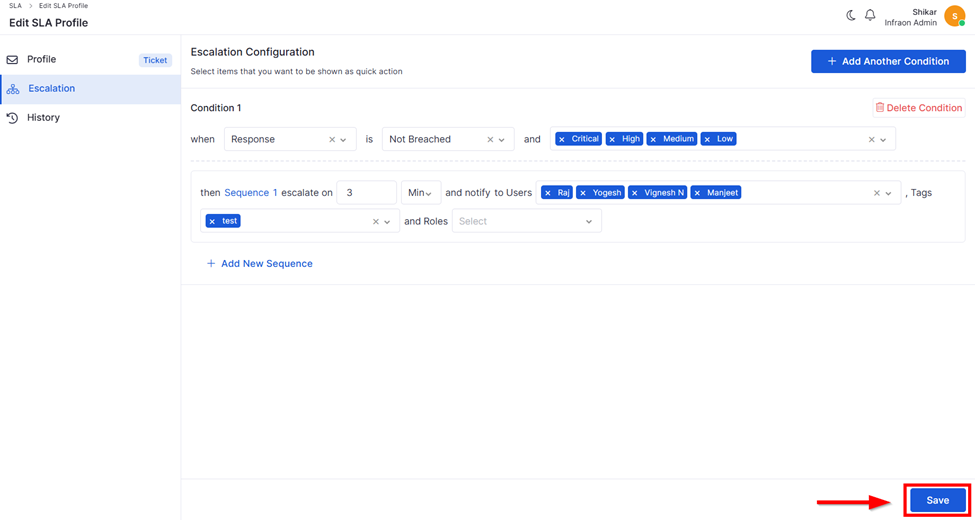
Escalation allows you to configure automated SLA notifications when a ticket is close to breaching or has already breached. You can define conditions, escalation sequences, and choose who should be notified (Users, Tags, or Roles).

Escalations are configured inside an **SLA Profile**, and you can set multiple conditions based on SLA timers (Response/Resolution), priority, and breach status.

**Configure Escalation**

<table data-header-hidden><thead><tr><th width="171.4000244140625" valign="top"></th><th width="196" valign="top"></th><th valign="top"></th></tr></thead><tbody><tr><td valign="top"><strong>Label</strong></td><td valign="top"><strong>Action</strong></td><td valign="top"><strong>Description / Example</strong></td></tr><tr><td valign="top"><strong>Condition</strong></td><td valign="top">Click Add Another Condition</td><td valign="top">Create a new escalation rule based on SLA type (Response/Resolution), breach status (Breached / Not Breached), and priority.</td></tr><tr><td valign="top"><strong>When</strong></td><td valign="top">Select SLA Type</td><td valign="top">Choose which SLA timer the condition applies to, e.g., Response.</td></tr><tr><td valign="top"><strong>Is</strong></td><td valign="top">Choose Breached / Not Breached</td><td valign="top">Define whether the escalation should trigger before SLA breach or after the SLA has breached.</td></tr><tr><td valign="top"><strong>Priority</strong></td><td valign="top">Select priority values</td><td valign="top">Choose the priorities (Critical/High/Medium/Low) for which escalation should apply.</td></tr><tr><td valign="top"><strong>Sequence</strong></td><td valign="top">Click Add New Sequence</td><td valign="top">Add one or more escalation sequences under the same condition.</td></tr><tr><td valign="top"><strong>Escalate On</strong></td><td valign="top">Select from the drop-down</td><td valign="top"><p>Defines when an escalation is triggered based on the SLA condition. Options include <strong>Minutes</strong> and <strong>Percentage (%).</strong><br></p><ul><li>When the condition is <strong>Not Breached</strong>, users can select <strong>Percentage (%)</strong> or <strong>Minutes</strong>. Percentage triggers escalation based on the configured percentage of the SLA target time (e.g., 20% of the <strong>SLA time elapsed</strong>).</li><li>When the condition is <strong>breached</strong>, the unit defaults to <strong>Minutes.</strong> Escalation triggers after the specified number of minutes post-breach (for example, 5 minutes after the <strong>breach</strong>).</li><li>For <strong>Percentage (%)</strong>, only values between <strong>1 and 100</strong> are allowed. Invalid values disable the <strong>Save</strong> action and display a validation message.</li></ul></td></tr><tr><td valign="top"><strong>Notify To – Users</strong></td><td valign="top">Select users</td><td valign="top">Notify selected individual users. The system ensures a user receives only one notification, even if added via Tag and Users.</td></tr><tr><td valign="top"><strong>Notify To – Tags</strong></td><td valign="top">Select tags</td><td valign="top">Notify all users linked to the selected Tag (e.g., L2-Support).</td></tr><tr><td valign="top"><strong>Notify To – Roles</strong></td><td valign="top">Select from the role list.</td><td valign="top">Available roles: Requester, Assignee, Team, Submitter, Owner, Followers, etc. A notification is sent to the live role mapped to the ticket.</td></tr></tbody></table>

<figure><img src="https://8249392-files.gitbook.io/~/files/v0/b/gitbook-x-prod.appspot.com/o/spaces%2FE4mkwSP8a1BSD9BFNFav%2Fuploads%2FRWi4WvIdneuoSUCZ2Zvx%2Fimage.png?alt=media&#x26;token=547805fd-8ce2-48c2-bcd7-704eeaa5c6a8" alt=""><figcaption></figcaption></figure>

Click **Save** to activate the escalation configuration in the SLA profile.
